Middle School Learning Platform

Peekapak

2022

ROLE

PRODUCT DESIGNER. SUPPORTED THE ROLLOUT OF THE MIDDLE SCHOOL LEARNING PLATFORM AS PART OF A COLLABORATIVE DESIGN TEAM.

IMPACT

+32% STUDENT TIME MANAGEMENT

+35% COMFORT LEVELS

+46% EMOTIONAL VOCABULARY

-30% STRESS LEVELS
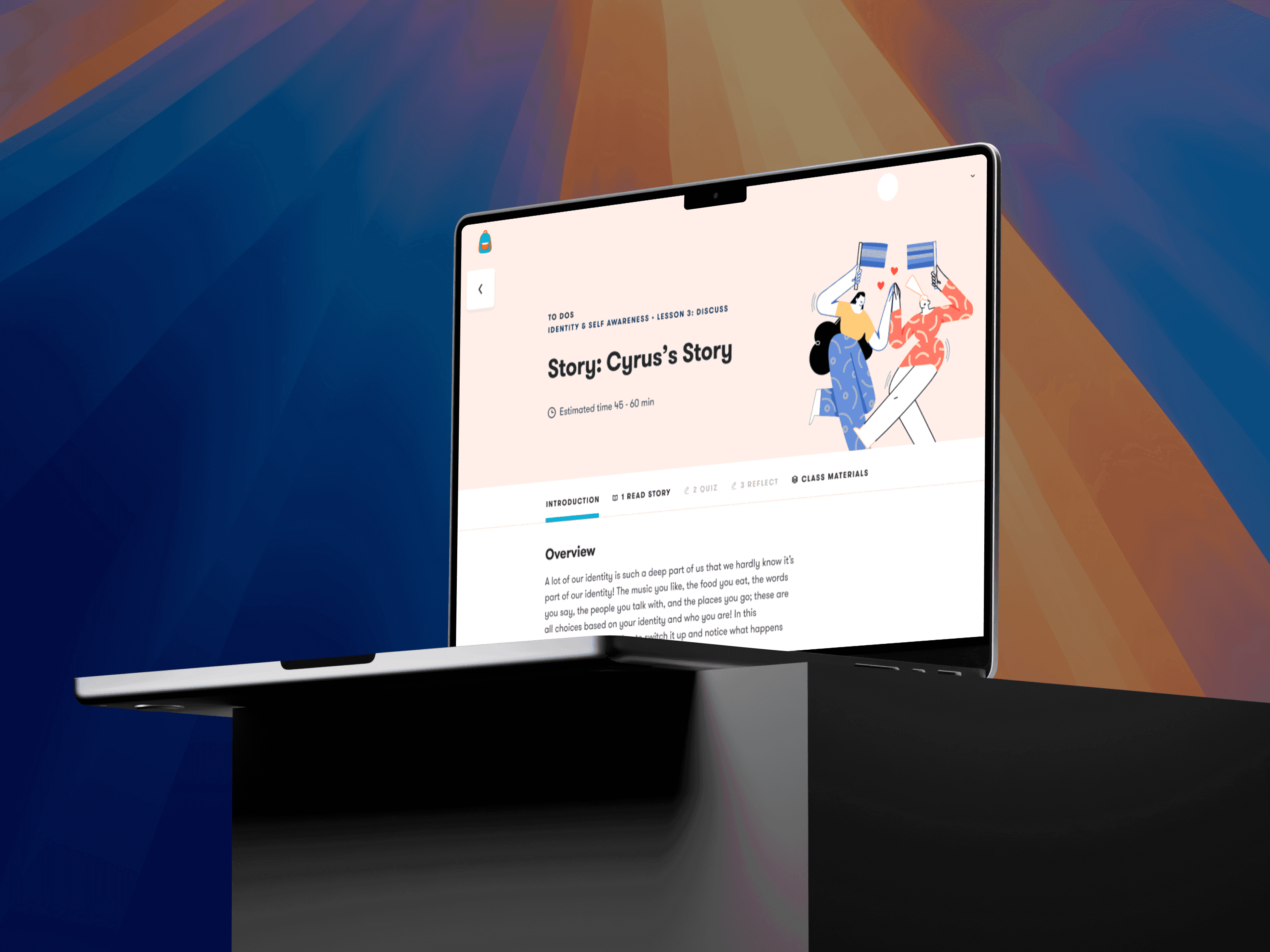
This image shows a side view of a laptop displaying the same educational module titled "Story: Cyrus’s Story", part of a curriculum on Identity & Self Awareness – Lesson 3: Discuss. The screen again shows the estimated time (45–60 minutes), along with navigation tabs for:  Introduction  Read Story  Quiz  Reflect  Class Materials  An illustration of two characters holding mirrors and smiling at each other appears at the top right, reinforcing the theme of self-awareness and identity. The background features vibrant, diagonal light beams in blue, orange, and purple tones, creating an engaging and modern educational visual.

INTRODUCTION

I joined Peekapak as a Product Designer to support the rollout of a new middle school learning platform, expanding the company’s existing elementary offering.

Prior to my involvement, Peekapak had identified a clear opportunity to serve middle school classrooms and conducted early discovery work with educators. This research revealed a critical constraint:

The platform designed for elementary learners could not effectively support middle school use cases.

Differences in learner autonomy, instructional structure, and curriculum complexity meant that adapting the existing product would introduce usability and scalability issues.

The team made the decision to explore a purpose-built experience for middle school—one that aligned with educator needs while supporting more independent student workflows.

The team made the decision to explore a purpose-built experience for middle school—one that aligned with educator needs while supporting more independent student workflows.

The team made the decision to explore a purpose-built experience for middle school—one that aligned with educator needs while supporting more independent student workflows.

My role focused on helping translate these early insights into a usable, scalable product foundation.

USER RESEARCH

Before exploring solutions, we focused on building a foundational understanding of our users to ensure the product direction was grounded in real classroom needs.

I conducted 5 qualitative interviews with teachers, parents, and school administrators to understand how middle school learning environments differ from elementary settings.

Due to ethical and legal constraints, I was unable to interview students directly. Instead, teachers and parents served as proxy users, providing insight into student behaviors, expectations, and challenges.
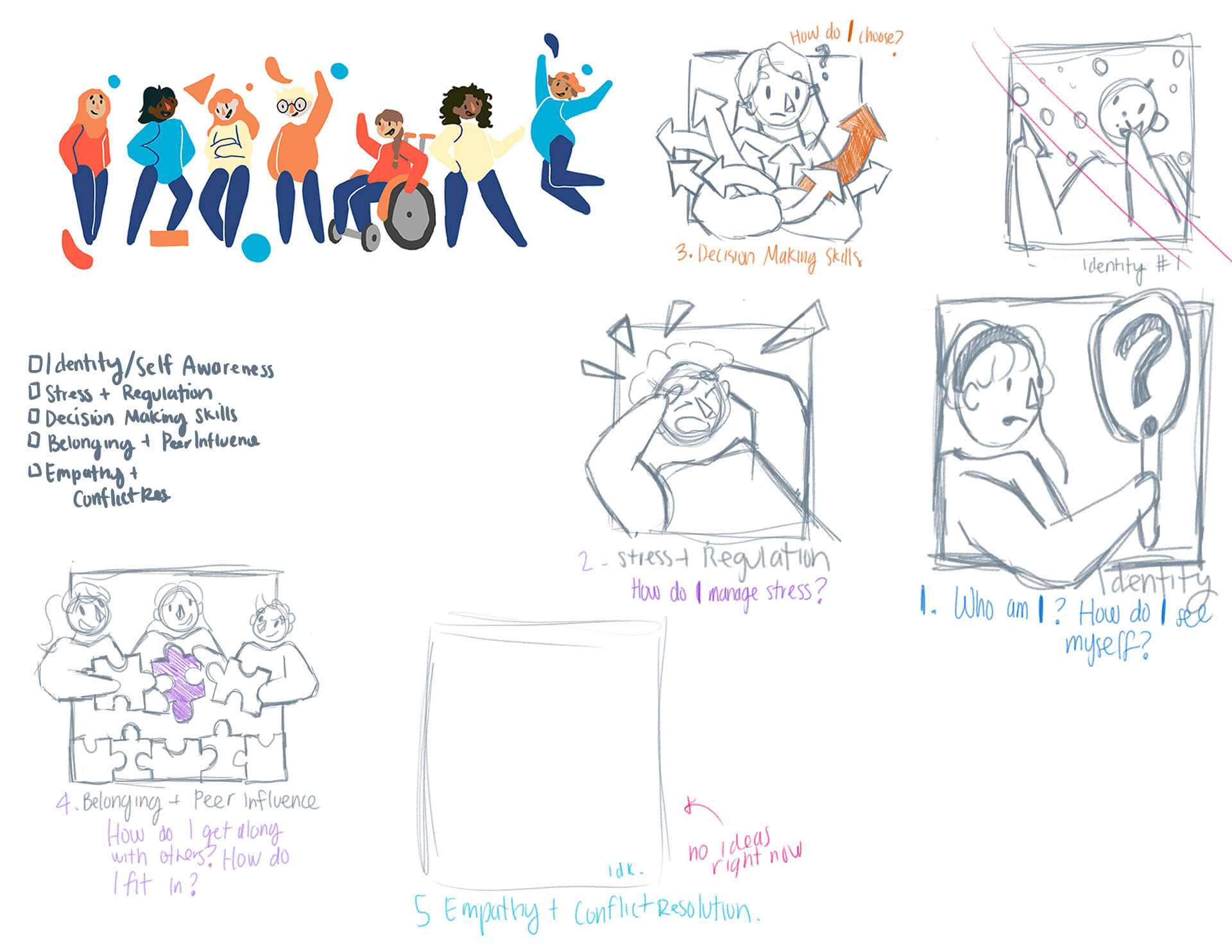
Colorful illustrated sketch showing five categories of social-emotional learning concepts through doodles and handwritten notes. Each section includes a rough drawing with guiding questions: “Who am I? How do I see myself?” for identity; a stressed figure surrounded by arrows for stress regulation; a person choosing among signs for decision-making; three kids assembling a puzzle with one purple piece for belonging and peer influence; and a blank space labeled “no ideas right now” for empathy and conflict resolution. At the top, a diverse group of kids celebrates together with playful poses.

In parallel, we reviewed middle school curricula across multiple subjects to better understand instructional goals, learning outcomes, and classroom dynamics.

This helped us align the product not just to user preferences, but to the educational intent behind the curriculum.

We identified the following insights, helping shape our digital strategy and subsequent design decisions:

This image features an abstract composition with dynamic, colorful light streaks. The visual includes:  A bright cyan-blue vertical streak toward the right.  A red to orange gradient streak intersecting the blue one from the left.  Deep black and dark maroon tones in the background, giving a strong contrast.  The effect suggests motion blur or light painting, commonly achieved through long exposure photography.  It conveys a sense of energy and fluidity, and could easily be interpreted as digital art or a stylized light abstraction.

Insight

The existing elementary platform was not a viable foundation for middle school.

Educators consistently described it as too juvenile in tone, interaction patterns, and visual language for older students.

This image features an abstract composition with dynamic, colorful light streaks. The visual includes:  A bright cyan-blue vertical streak toward the right.  A red to orange gradient streak intersecting the blue one from the left.  Deep black and dark maroon tones in the background, giving a strong contrast.  The effect suggests motion blur or light painting, commonly achieved through long exposure photography.  It conveys a sense of energy and fluidity, and could easily be interpreted as digital art or a stylized light abstraction.

Insight

The existing elementary platform was not a viable foundation for middle school.

Educators consistently described it as too juvenile in tone, interaction patterns, and visual language for older students.

This image features an abstract composition with dynamic, colorful light streaks. The visual includes:  A bright cyan-blue vertical streak toward the right.  A red to orange gradient streak intersecting the blue one from the left.  Deep black and dark maroon tones in the background, giving a strong contrast.  The effect suggests motion blur or light painting, commonly achieved through long exposure photography.  It conveys a sense of energy and fluidity, and could easily be interpreted as digital art or a stylized light abstraction.

Insight

The existing elementary platform was not a viable foundation for middle school.

Educators consistently described it as too juvenile in tone, interaction patterns, and visual language for older students.

This image features the iconic Old Hill Street Police Station in Singapore. The building is well-known for its vibrant, multi-colored windows arranged in a rainbow pattern across its facade. The architecture is neoclassical and colonial in style.  In the foreground, there is a motion-blurred effect of fast-moving vehicles, adding a dynamic and modern contrast to the historical building. The street markings and vehicles suggest a busy urban setting, while the bright colors of the windows make the building visually striking and culturally distinctive.

Insight

Learning goals shift significantly in middle school.

Students move from acquiring foundational knowledge to applying concepts in real-world contexts, requiring more autonomy, critical thinking, and contextualized activities.

This image features the iconic Old Hill Street Police Station in Singapore. The building is well-known for its vibrant, multi-colored windows arranged in a rainbow pattern across its facade. The architecture is neoclassical and colonial in style.  In the foreground, there is a motion-blurred effect of fast-moving vehicles, adding a dynamic and modern contrast to the historical building. The street markings and vehicles suggest a busy urban setting, while the bright colors of the windows make the building visually striking and culturally distinctive.

Insight

Learning goals shift significantly in middle school.

Students move from acquiring foundational knowledge to applying concepts in real-world contexts, requiring more autonomy, critical thinking, and contextualized activities.

This image features the iconic Old Hill Street Police Station in Singapore. The building is well-known for its vibrant, multi-colored windows arranged in a rainbow pattern across its facade. The architecture is neoclassical and colonial in style.  In the foreground, there is a motion-blurred effect of fast-moving vehicles, adding a dynamic and modern contrast to the historical building. The street markings and vehicles suggest a busy urban setting, while the bright colors of the windows make the building visually striking and culturally distinctive.

Insight

Learning goals shift significantly in middle school.

Students move from acquiring foundational knowledge to applying concepts in real-world contexts, requiring more autonomy, critical thinking, and contextualized activities.

Together, these insights reinforced the need for a purpose-built middle school experience—one that respected student maturity while supporting educators’ instructional goals.

STAKEHOLDERS & USER ARCHETYPES

We translated our findings into user archetypes to help humanize the data and bridge the gap between research and design.

These archetypes ensured that product decisions stayed grounded in real needs, constraints, and motivations throughout the project. Through this process, we identified two primary stakeholder groups with distinct goals and responsibilities:

This image captures a striking piece of modern architecture, likely the interior ceiling or wall of a contemporary structure. The design features a series of parallel, curved vertical lines or ribs that bend gracefully, creating a dynamic, flowing form. The soft gradient lighting enhances the sense of depth and movement, emphasizing the smooth, wave-like transition of the lines. This architectural style is reminiscent of designs by Santiago Calatrava, known for futuristic and organic shapes, such as those seen in the Oculus at the World Trade Center in New York.

Stakeholder

Administrators (Buyers)

Administrators were the primary buyers and decision-makers. Their concerns centered on the investment, adoption, and long-term viability of the curriculum and platform.
This image captures a striking piece of modern architecture, likely the interior ceiling or wall of a contemporary structure. The design features a series of parallel, curved vertical lines or ribs that bend gracefully, creating a dynamic, flowing form. The soft gradient lighting enhances the sense of depth and movement, emphasizing the smooth, wave-like transition of the lines. This architectural style is reminiscent of designs by Santiago Calatrava, known for futuristic and organic shapes, such as those seen in the Oculus at the World Trade Center in New York.

Stakeholder

Administrators (Buyers)

Administrators were the primary buyers and decision-makers. Their concerns centered on the investment, adoption, and long-term viability of the curriculum and platform.

This image captures a striking piece of modern architecture, likely the interior ceiling or wall of a contemporary structure. The design features a series of parallel, curved vertical lines or ribs that bend gracefully, creating a dynamic, flowing form. The soft gradient lighting enhances the sense of depth and movement, emphasizing the smooth, wave-like transition of the lines. This architectural style is reminiscent of designs by Santiago Calatrava, known for futuristic and organic shapes, such as those seen in the Oculus at the World Trade Center in New York.

Stakeholder

Administrators (Buyers)

Administrators were the primary buyers and decision-makers. Their concerns centered on the investment, adoption, and long-term viability of the curriculum and platform.

This image shows a silhouetted figure behind a ribbed or textured glass panel. The glass creates a distorted, blurred effect, obscuring the person’s features while still allowing light and shape to come through. The individual appears to be seated, possibly holding a phone or object, within a modern interior setting like an office or café. The composition creates a sense of privacy, mystery, and modern design, often used architecturally to balance visibility with discretion.

Stakeholder

Students & Educators (Users)

Students and educators were the primary users of the platform. Their needs focused on the quality, relevance, and delivery of the curriculum in day-to-day classroom use.

This image shows a silhouetted figure behind a ribbed or textured glass panel. The glass creates a distorted, blurred effect, obscuring the person’s features while still allowing light and shape to come through. The individual appears to be seated, possibly holding a phone or object, within a modern interior setting like an office or café. The composition creates a sense of privacy, mystery, and modern design, often used architecturally to balance visibility with discretion.

Stakeholder

Students & Educators (Users)

Students and educators were the primary users of the platform. Their needs focused on the quality, relevance, and delivery of the curriculum in day-to-day classroom use.

This image shows a silhouetted figure behind a ribbed or textured glass panel. The glass creates a distorted, blurred effect, obscuring the person’s features while still allowing light and shape to come through. The individual appears to be seated, possibly holding a phone or object, within a modern interior setting like an office or café. The composition creates a sense of privacy, mystery, and modern design, often used architecturally to balance visibility with discretion.

Stakeholder

Students & Educators (Users)

Students and educators were the primary users of the platform. Their needs focused on the quality, relevance, and delivery of the curriculum in day-to-day classroom use.

Distinguishing between buyers and users helped us balance strategic decision-making with everyday usability—ensuring the platform met institutional requirements without compromising the learning experience.

DIGITAL STRATEGY

Rather than adapting the elementary experience, we carried forward its core SEL foundations and evolved them to reflect a key developmental shift: moving from learning concepts to applying them in real-world situations.

Recognizing the role of social-emotional learning in supporting both student well-being and academic success, we set out to design a curriculum intentionally built for the middle school context.

This image features a silhouetted person standing on a rocky terrain at sunset or sunrise. The figure, dressed in a hoodie, stands with one foot elevated on a rock, striking a pose that conveys contemplation or triumph. The background sky transitions from light near the horizon to darker at the top, and a faint airplane contrail cuts diagonally across the sky, adding a sense of motion to the otherwise still scene. The dramatic contrast and composition evoke themes of solitude, achievement, and reflection in nature.

Design Goal

We anchored the middle school curriculum around human interest stories.

These narratives became the primary vehicle for introducing and reinforcing SEL concepts, allowing students to engage with situations that felt relevant, realistic, and emotionally grounded.

This image features a silhouetted person standing on a rocky terrain at sunset or sunrise. The figure, dressed in a hoodie, stands with one foot elevated on a rock, striking a pose that conveys contemplation or triumph. The background sky transitions from light near the horizon to darker at the top, and a faint airplane contrail cuts diagonally across the sky, adding a sense of motion to the otherwise still scene. The dramatic contrast and composition evoke themes of solitude, achievement, and reflection in nature.

Design Goal

We anchored the middle school curriculum around human interest stories.

These narratives became the primary vehicle for introducing and reinforcing SEL concepts, allowing students to engage with situations that felt relevant, realistic, and emotionally grounded.

This image features a silhouetted person standing on a rocky terrain at sunset or sunrise. The figure, dressed in a hoodie, stands with one foot elevated on a rock, striking a pose that conveys contemplation or triumph. The background sky transitions from light near the horizon to darker at the top, and a faint airplane contrail cuts diagonally across the sky, adding a sense of motion to the otherwise still scene. The dramatic contrast and composition evoke themes of solitude, achievement, and reflection in nature.

Design Goal

We anchored the middle school curriculum around human interest stories.

These narratives became the primary vehicle for introducing and reinforcing SEL concepts, allowing students to engage with situations that felt relevant, realistic, and emotionally grounded.

By weaving these stories throughout the platform, abstract SEL principles were translated into tangible scenarios that encouraged empathy, self-reflection, and critical thinking. This approach helped students understand not just what the concepts were, but why they mattered—and how to apply them beyond the classroom.

WIREFRAMING & OUTLINING THE CURRICULUM

We curated a broad set of human-centered SEL stories and worked closely with educators to identify the core concepts each story could support.

This collaboration helped ensure the curriculum aligned with middle school developmental needs while remaining practical for classroom use.
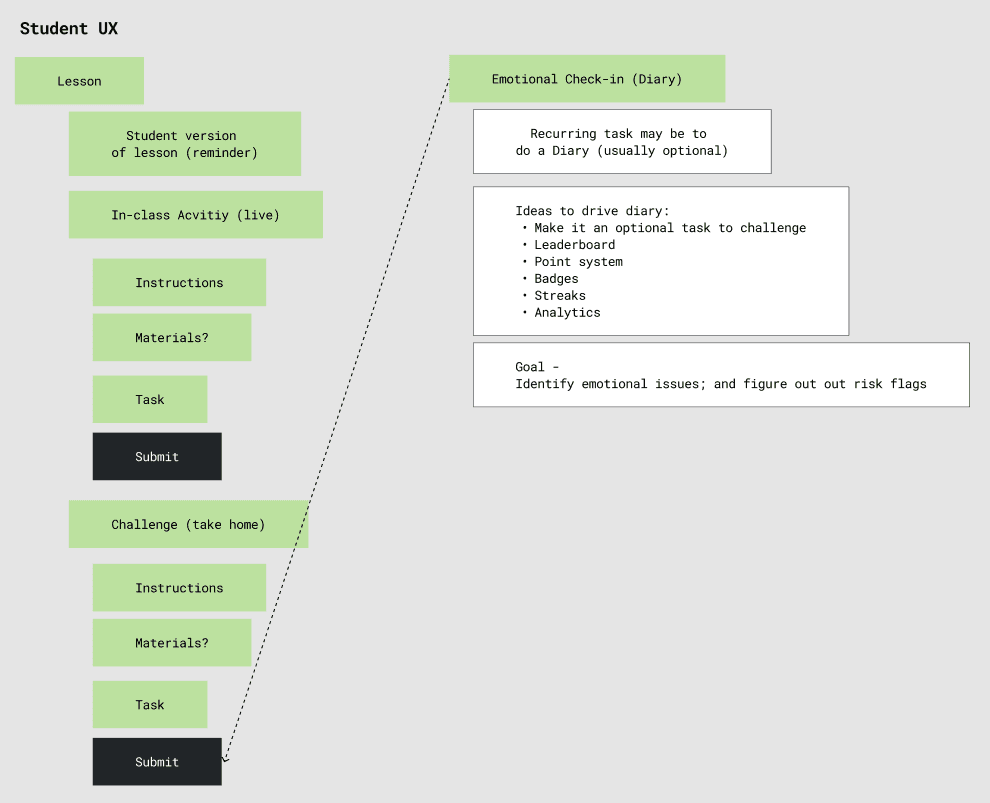
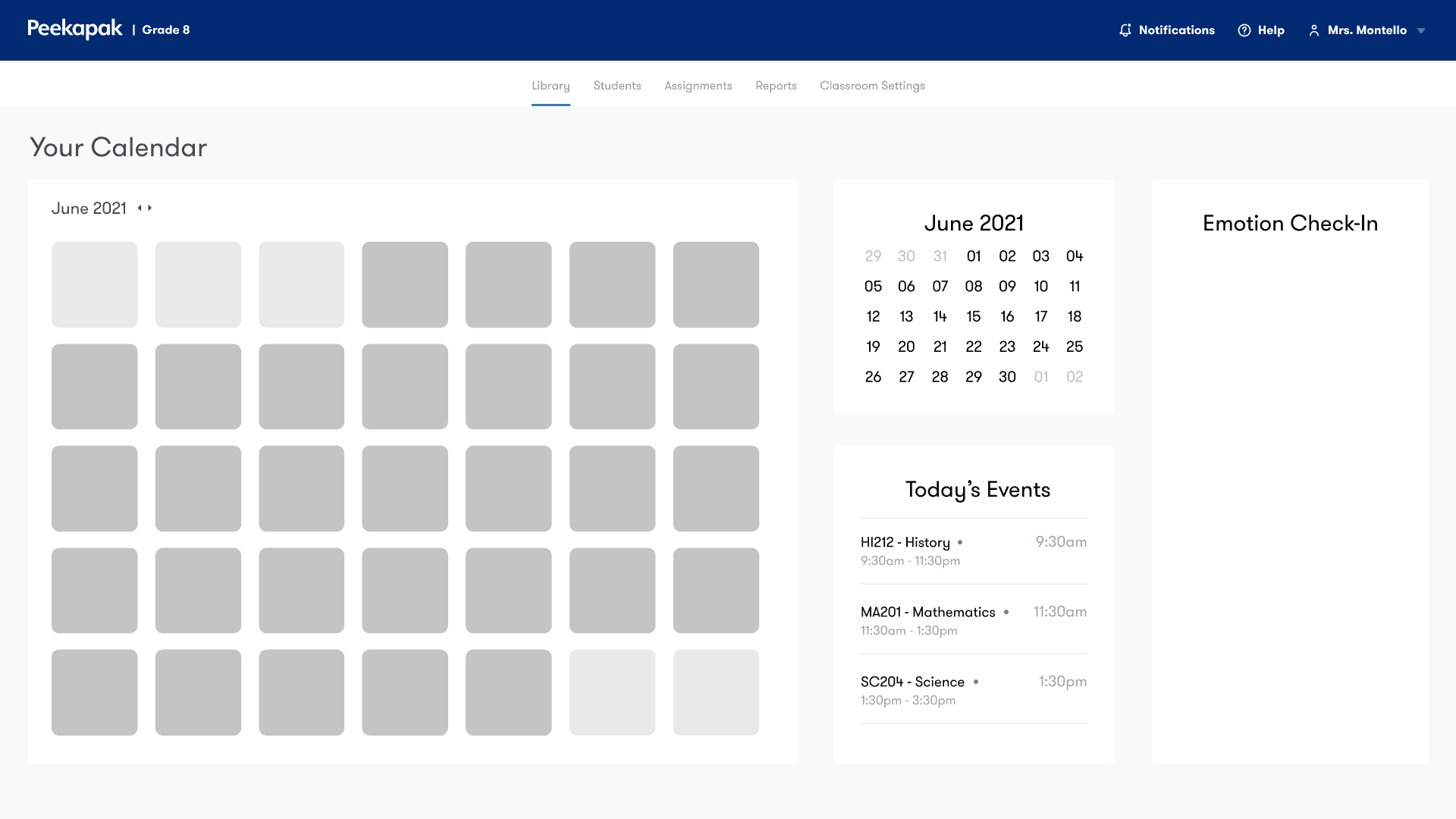
This diagram outlines a Student UX (User Experience) flow for a lesson-based educational platform, integrating emotional wellness tracking through a diary feature. Here's a breakdown of the flow:  Left Side: Core Student Lesson Workflow  Lesson  Start of the learning module.  Student Version of Lesson (Reminder)  Possibly a simplified recap or reference version.  In-Class Activity (Live)  Interactive component during class.  Instructions  Details or guidance for the activity.  Materials?  Optional or required resources.  Task  The actual work or activity to be completed.  Submit (Button)  Turn in completed in-class task.  Challenge (Take Home) Flow  Challenge (Take Home)  Homework or continued learning outside of class.  Instructions  Guidance specific to the challenge.  Materials?  Resources needed for take-home work.  Task  The activity or exercise to be done.  Submit (Button)  Submit completed take-home challenge.  Right Side: Emotional Check-in (Diary)  Optional Recurring Task: Diary  May be tied to challenge tasks.  Ideas to Drive Diary Use:  Make it a challenge  Leaderboards  Points  Badges  Streak tracking  Analytics  Goal:  Detect emotional concerns  Identify risk flags early  Summary  This UX flow blends academic task completion with emotional health tracking, encouraging students to reflect on their feelings in a structured way, potentially helping educators intervene when emotional red flags are present. Gamification strategies are proposed to increase diary participation.
This image shows a classroom management dashboard for a Grade 8 teacher using Peekapak. Here’s a breakdown of its features and layout:  Top Navigation Bar  Peekapak | Grade 8 branding.  Navigation tabs:  Library (active)  Students  Assignments  Reports  Classroom Settings  Top-right icons:  Notifications  Help  Profile (Mrs. Montello)  Main Interface Left Section: Calendar View  A full month view calendar (June 2021).  Each day is represented by a gray square (likely placeholders for scheduled content or activities).  Center Section  Mini calendar for date reference.  Today’s Events:  HI212 - History: 9:30am–11:30am  MA201 - Mathematics: 11:30am–1:30pm  SC204 - Science: 1:30pm–3:30pm (All with red dots, likely indicating scheduled sessions or important events)  Right Section: Emotion Check-In  A section titled "Emotion Check-In", currently empty.  This likely ties into the emotional wellness component referenced in the earlier UX flow.  Potentially for students to record or reflect on their emotions or mental state for the day.  Summary  This dashboard integrates:  Calendar-based lesson planning  Live event tracking  Emotional wellness features (check-ins)  It aligns with the earlier student UX flow and diary check-in concept—bridging academics and social-emotional learning (SEL).

In parallel, we created low-fidelity wireframes to map the end-to-end user journey and define the platform’s primary features.

These wireframes allowed us to validate content flow, lesson structure, and interaction patterns early, ensuring the experience supported both instructional clarity for educators and independent navigation for students.

HIGH-FIDELITY DESIGN

With the curriculum structure and core user journeys established, we translated our work into high-fidelity designs that brought the platform together as a cohesive experience.

These designs focused on supporting two distinct but connected journeys: the student learning experience and the educator oversight experience.
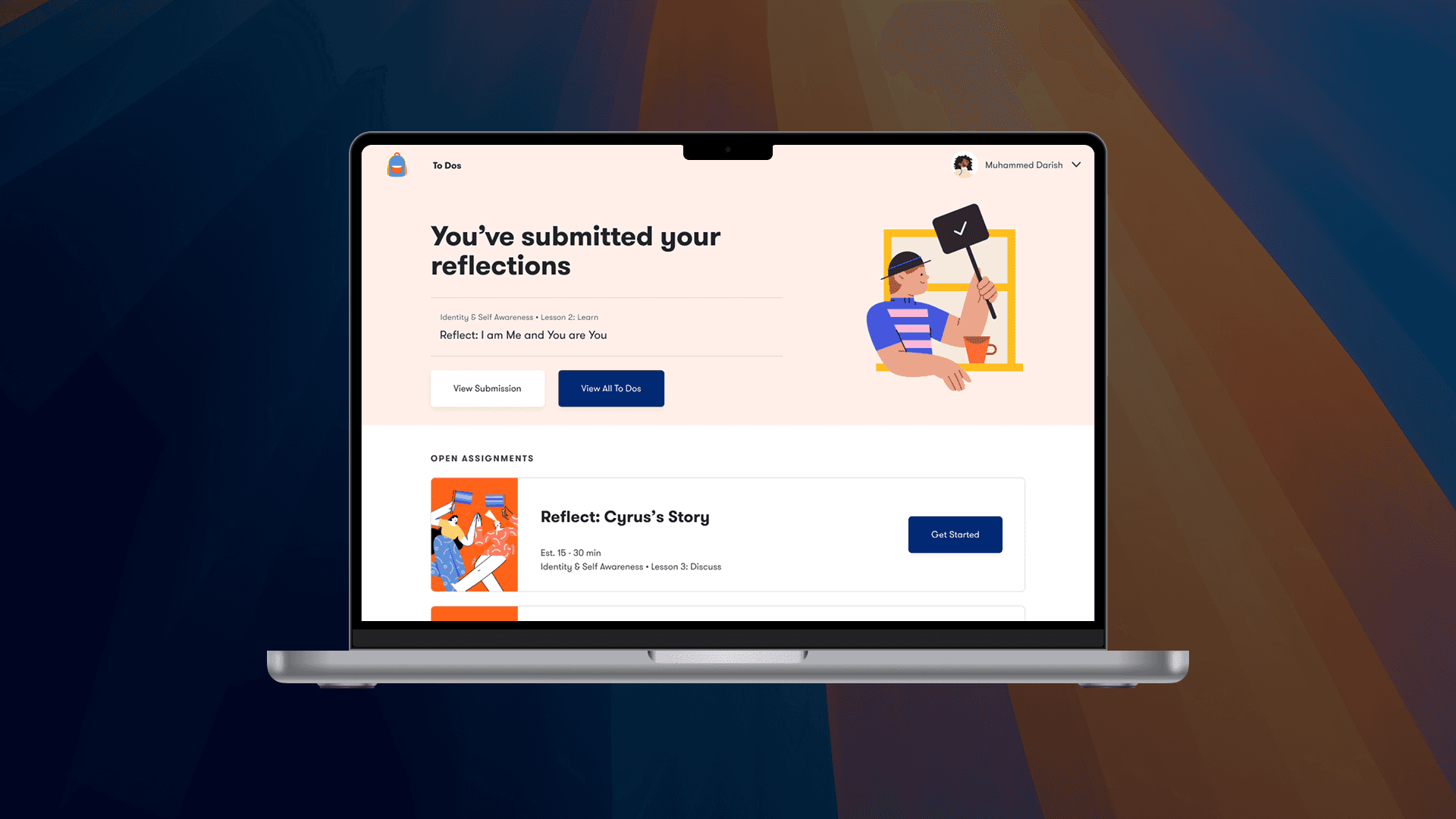
This image shows a student dashboard interface on a laptop, likely from an educational platform focused on social-emotional learning. Here's a breakdown:  Main Message  “You’ve submitted your reflections”  This confirms that the student (Muhammed Darish) has completed a reflective assignment.  Specific reflection: “Reflect: I am Me and You are You” (Part of Identity & Self Awareness – Lesson 2: Learn)  Two buttons available:  View Submission  View All To Dos  Open Assignments Section  Below the confirmation, there’s another task:  Reflect: Cyrus’s Story  Estimated time: 15–30 minutes  Belongs to: Identity & Self Awareness – Lesson 3: Discuss  A “Get Started” button is present for beginning the activity.  Design Notes  Uses clean, student-friendly design with illustrations.  Continuity with the emotional check-in flow and reflective writing focus seen earlier.  Encourages self-exploration and personal insight through structured reflection tasks.  Summary  This screen shows the student journey post-submission, confirming task completion and prompting the next reflection assignment. It supports emotional and identity development through guided, trackable steps.

THE STUDENT EXPERIENCE

For students, we designed clear navigation patterns, structured lesson layouts, and feedback moments that felt supportive and personal rather than evaluative.

The goal was to encourage reflection and engagement while reinforcing a sense of progress and autonomy.
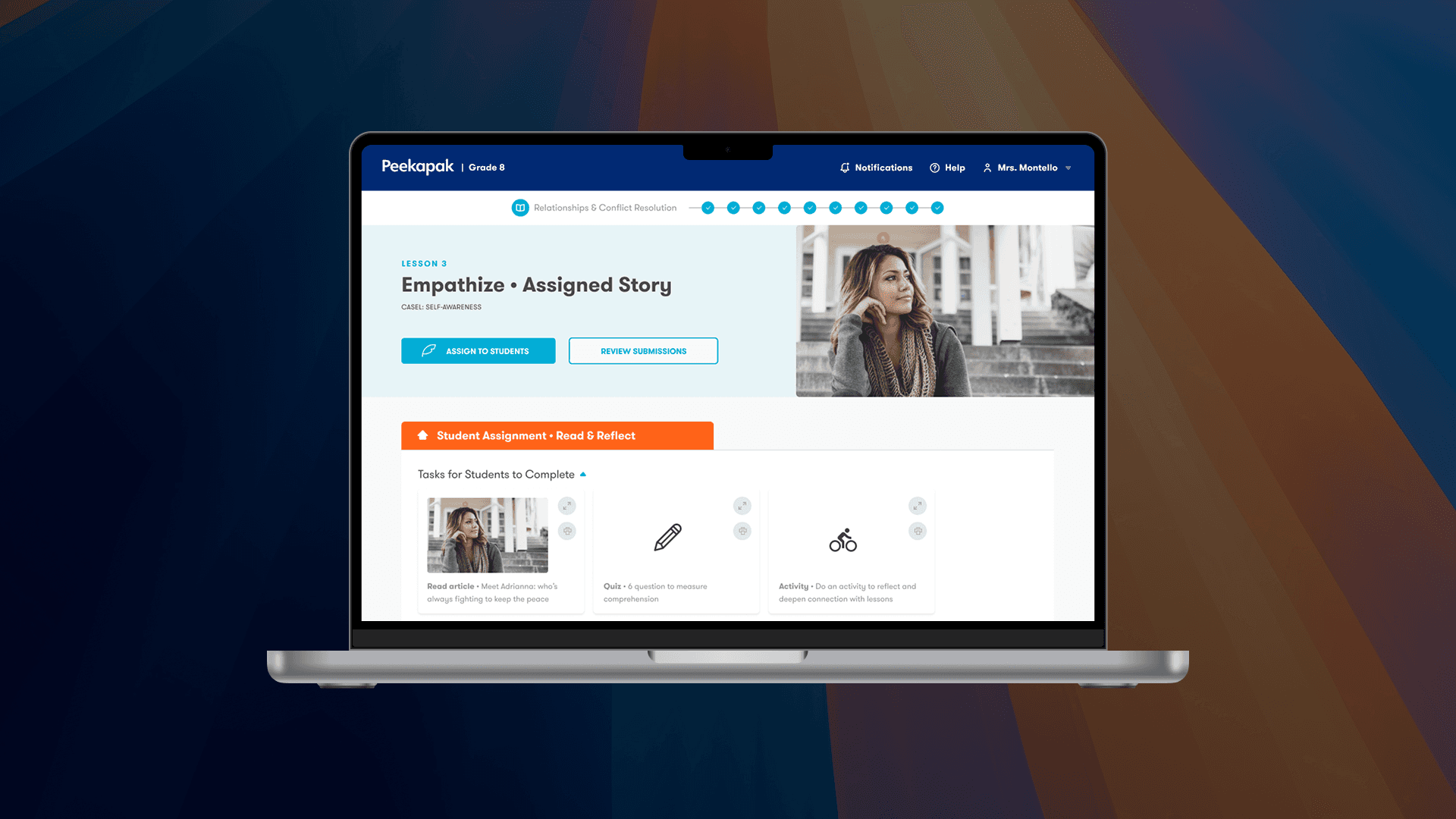
This image shows a teacher’s dashboard on the Peekapak platform, specifically for Grade 8 and centered on Lesson 3: Empathize • Assigned Story under the Self-Awareness unit.  Key UI Elements: Header:  Platform: Peekapak  Grade Level: Grade 8  Section: Relationship & Conflict Resolution  Teacher account: Mrs. Montello  Quick access to: Notifications, Help  Main Content: Lesson 3: Empathize • Assigned Story  The interface shows a student-focused lesson with an image of a girl who likely represents the story's subject.  Buttons:  Assign to Students  Review Submissions  Student Assignment Section (Highlighted in Orange):  Tasks for Students to Complete:  Read article: "Meet Adrianna, who’s fighting to keep the peace."  Quiz: A 6-question quiz to assess comprehension.  Activity: A reflection or connection-based task to deepen learning.  Purpose:  This screen is part of the teacher workflow where they:  Assign lessons  Monitor student progress  Review reflective/empathy-building activities  Measure understanding through quizzes  Summary:  This is a teacher-facing view designed to guide lesson planning and student engagement around SEL (Social Emotional Learning) topics—specifically empathy and conflict resolution through stories, reading, quizzes, and reflections.

THE STUDENT EXPERIENCE

For educators, we designed an experience to help educators quickly understand how students were progressing through the curriculum, identify areas that needed attention, and feel confident facilitating discussions without added administrative burden.

The goal was an experience focused on an at-a-glance overview of student activity and performance.

Together, these high-fidelity designs ensured the platform supported independent student learning while giving educators the visibility and control they needed to guide it effectively.

LAUNCH & IMPACT

Following the launch of the middle school learning platform, we saw immediate traction during rollout. Administrators began adopting the curriculum within schools that were already using Peekapak’s elementary offering, allowing for a smoother transition and faster implementation.

Sales

Educators reported stress management among students increased by 29%

Sales

Educators reported stress management among students increased by 29%

Time Management

Student time management skills increased by 32%

Time Management

Student time management skills increased by 32%

Comfort Levels

Student comfort levels increased by 35%

Comfort Levels

Student comfort levels increased by 35%

SEL

Educators saw a 46% increase in emotional vocabulary

SEL

Educators saw a 46% increase in emotional vocabulary

Sales

Educators reported stress management among students increased by 29%

Sales

Educators reported stress management among students increased by 29%

Time Management

Student time management skills increased by 32%

Time Management

Student time management skills increased by 32%

Comfort Levels

Student comfort levels increased by 35%

Comfort Levels

Student comfort levels increased by 35%

SEL

Educators saw a 46% increase in emotional vocabulary

SEL

Educators saw a 46% increase in emotional vocabulary

In addition to the positive learning and emotional impacts, the platform scaled rapidly, growing the user base by over 300,000 students within the first year of rollout.

By aligning tone, structure, and learning models with middle school developmental needs, the product supported meaningful engagement at scale—validating both the usability of the experience and the effectiveness of the underlying curriculum and design decisions.

REFLECTION & NEXT STEPS

Seeing the impact the curriculum had on students and educators was both exciting and deeply gratifying—it reinforced the value of grounding content decisions in real classroom needs. With more time, I would have liked to expand the research phase, particularly through additional user interviews, to further validate assumptions and explore edge cases.

With more time, I would have liked to expand the research phase, particularly through additional user interviews, to further validate assumptions and explore edge cases.

That said, given a tight deadline and a fast-moving project, we delivered a strong, cohesive solution that balanced quality with the realities of timeline and budget constraints.

When I left Peekapak, the product was well positioned to scale, providing a flexible foundation that enabled the team to expand the curriculum beyond its initial scope and into grades 8–12.
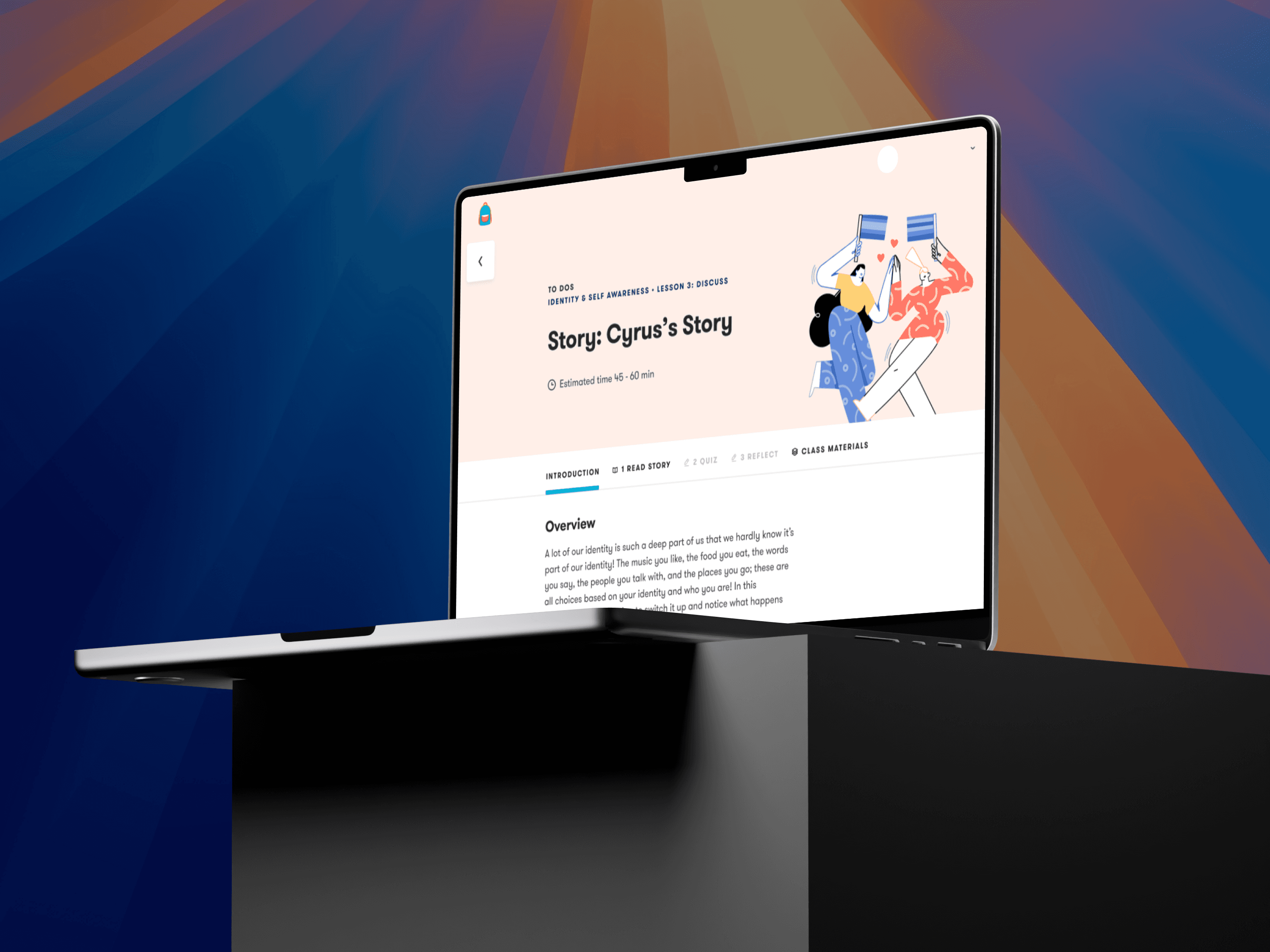

This image shows a side view of a laptop displaying the same educational module titled "Story: Cyrus’s Story", part of a curriculum on Identity & Self Awareness – Lesson 3: Discuss. The screen again shows the estimated time (45–60 minutes), along with navigation tabs for:  Introduction  Read Story  Quiz  Reflect  Class Materials  An illustration of two characters holding mirrors and smiling at each other appears at the top right, reinforcing the theme of self-awareness and identity. The background features vibrant, diagonal light beams in blue, orange, and purple tones, creating an engaging and modern educational visual.

📮

Stay connected

From time to time, I share updates about new work and the ideas shaping my design story. If you’d like to stay connected, you’re welcome to subscribe.

Avatar
Avatar

Avatar

Avatar

A small group of thoughtful readers

📮

Stay connected

From time to time, I share updates about new work and the ideas shaping my design story. If you’d like to stay connected, you’re welcome to subscribe.

Avatar
Avatar

Avatar

Avatar

A small group of thoughtful readers

📮

Stay connected

From time to time, I share updates about new work and the ideas shaping my design story. If you’d like to stay connected, you’re welcome to subscribe.

Avatar
Avatar

Avatar

Avatar

A small group of thoughtful readers

" Design is not just what it looks like and feels like. Design is how it works "

— Steve Jobs

UX DESIGNER

" Design is not just what it looks like and feels like. Design is how it works "

— Steve Jobs

UX DESIGNER

" Design is not just what it looks like and feels like. Design is how it works "

— Steve Jobs

UX DESIGNER