Green Pages
William & Mary University
2022-2023
ROLE
LEAD UX DESIGNER. LED A TEAM OF DESIGNERS, OVERSEEING END-TO-END USER RESEARCH AND DESIGN.
IMPACT
WINNER OF THE 2023 SCOTIABANK CAPSTONE DESIGN AWARD (THIRD PLACE).
INTRODUCTION
William & Mary approached our team with several challenges around information management within the Institute for Integrative Conservation. Their work spans interdisciplinary fields and relies on contributions from scientists, practitioners, partners, and students. Despite the richness of this network, their workflows often felt fragmented. Across early conversations with their team, one theme kept coming up:
The sheer volume of conservation data made it hard to distill, connect, and share information without overwhelming users.
Important details lived in different systems, formats, and personal networks. As a result, even simple tasks—like finding the right resource or identifying the author of a relevant project—took more time and effort than expected.
COMPETITIVE ANALYSIS
To understand the landscape we were designing within, we began with a competitive analysis focused on tools commonly used in conservation and adjacent knowledge domains. Our goal was to see how existing platforms organize information, support learning, and encourage ongoing engagement. We also wanted to identify patterns that could inform how our solution might bridge current gaps.
We evaluated each tool on clarity of information, ease of navigation, content credibility, and opportunities for user interaction.
I led synthesis of the findings, identifying two distinct competitive categories that informed our positioning:

Competitors
Knowledge Tools
These platforms serve as scientifically grounded repositories. They offer reliable, well-documented information and are strong resources for learning. However, many presented large volumes of content without helping users quickly extract what’s most relevant, which can increase cognitive load.
Competitors
Engaging Content Platforms
These sites and applications focus on interactive, visually engaging content that keeps users returning. While they succeed at drawing users in, they often lack the depth or verification needed for evidence-based fieldwork.
This analysis highlighted a gap: conservation professionals need both credibility and usability. Tools must present accurate information while supporting fast, intuitive exploration—without overwhelming the user. This gap guided the direction of our early concepts.
USER RESEARCH
To ground the project in real conservation workflows, we conducted 10+ of moderated interviews with experts across the industry.
Our participants represented a wide range of domains—grasslands, bird conservation, oyster restoration, and additional ecological specialties—with experience levels spanning 10 to 40 years. We also spoke with environmental students to capture emerging perspectives and understand how early-career conservationists navigate information.
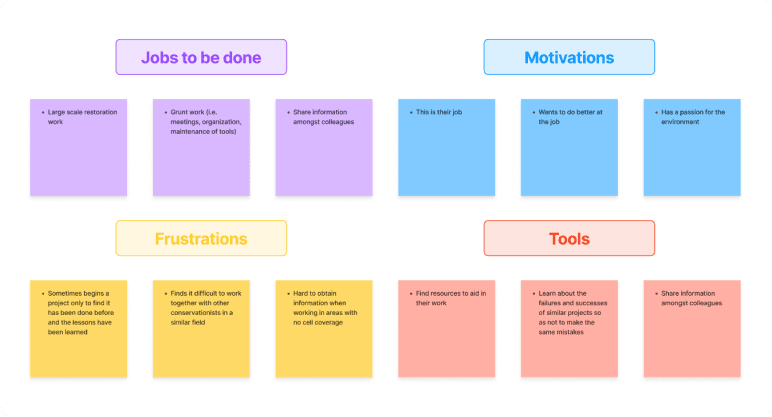
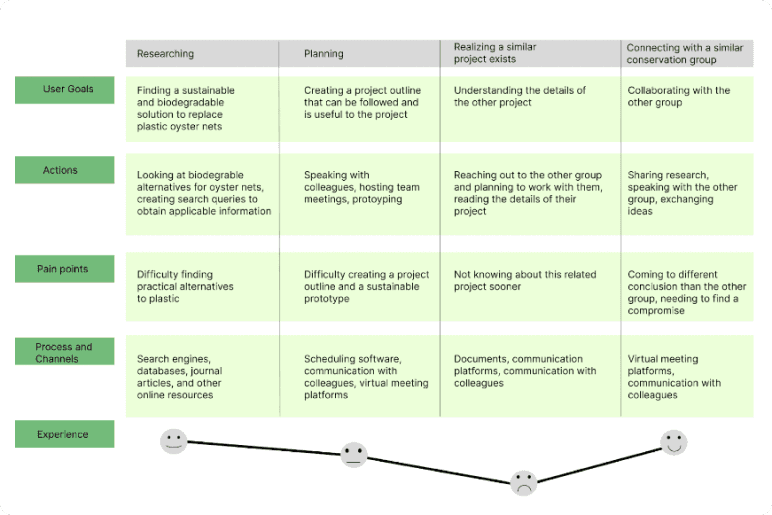
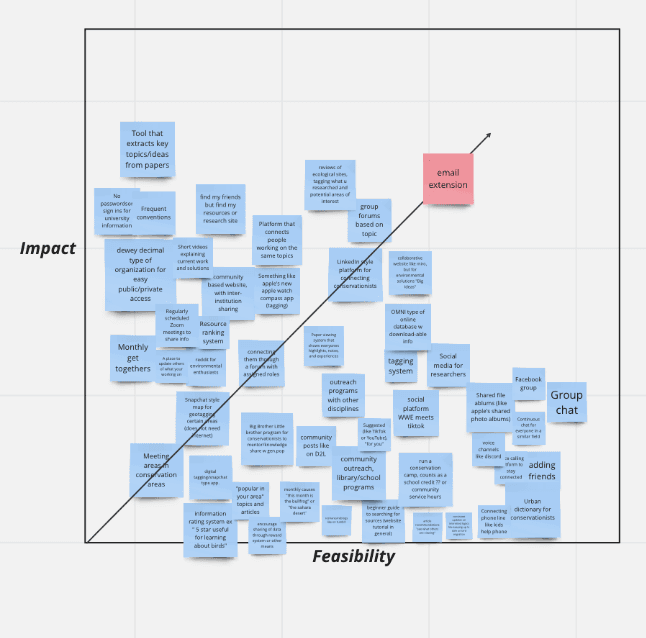
Across these conversations, we mapped out their goals, actions, and day-to-day challenges using job-to-be-done exercises and a journey map.
This helped us see how information supports each stage of their work, from early research to collaborating with other groups.
KEY PAIN POINTS
After completing the first round of user interviews, I synthesized the data to look for recurring patterns and themes. Two primary pain points emerged and were mentioned consistently across multiple participants, signaling shared usability challenges.

Pain Point
Limited Access to Reliable Information
Many conservationists struggled to access up-to-date resources. Critical documents were often behind firewalls or university logins they no longer had access to. Others faced the opposite challenge: no internet access at all when working in remote locations. Both scenarios forced them to rely on fragmented workarounds, making research slower and less dependable.

Pain Point
Heavy Reliance on Informal
Knowledge Sharing
Participants consistently emphasized how much they rely on colleagues, partners, and broader networks to fill information gaps. While these relationships are valuable, there is no centralized or easy-to-use platform for sharing lessons learned, past project outcomes, or relevant contacts. This makes it difficult to avoid repeating past mistakes, identify overlapping work, or connect with the right people at the right time.
OPPORTUNITIES
Conservationists need a more unified and accessible way to find trustworthy information and connect with others doing similar work.
A tool that strengthens collaboration, reduces repeated effort, and surfaces credible contacts could significantly reduce friction across their workflow.
STAKEHOLDERS
Synthesizing our interview findings, I identified two primary stakeholder groups whose needs shaped the direction of the solution.

Stakeholder
The Contributor
Contributors are individuals who generate knowledge—scientists, academics, field experts, and other passionate practitioners. They often hold deep, tacit information that’s valuable to the broader community, but they need clear incentives and accessible platforms to share their insights. Without the right structures in place, their contributions remain siloed in personal networks, reports, or hard-to-find resources.

Stakeholder
The Worker
Workers rely on this information to complete tasks in structured environments such as government agencies, zoos, classrooms, laboratories, forests, and marine sites. Their workflows are often time-sensitive and split between office and field settings, making quick access to credible, relevant information essential. When information is buried behind logins or spread across multiple systems, their efficiency drops and decision-making becomes harder.
SHARED NEEDS
They need tools that strengthen collaboration, reduce duplicated work, and bridge the gap between knowledge and action.
Despite their different roles, both groups depend on seamless access to trustworthy information and reliable contacts.
DESIGN GOALS

The goal was to create a tool that helps conservationists easily connect with others working on similar projects, access trustworthy information, and work more efficiently.
The platform needed to support collaboration and knowledge sharing, offer clear verification of authors and sources, and present information in a way that is intuitive, lightweight, and faster than current methods. Above all, it needed to reduce friction in the research process rather than add to it.
WIREFRAMING
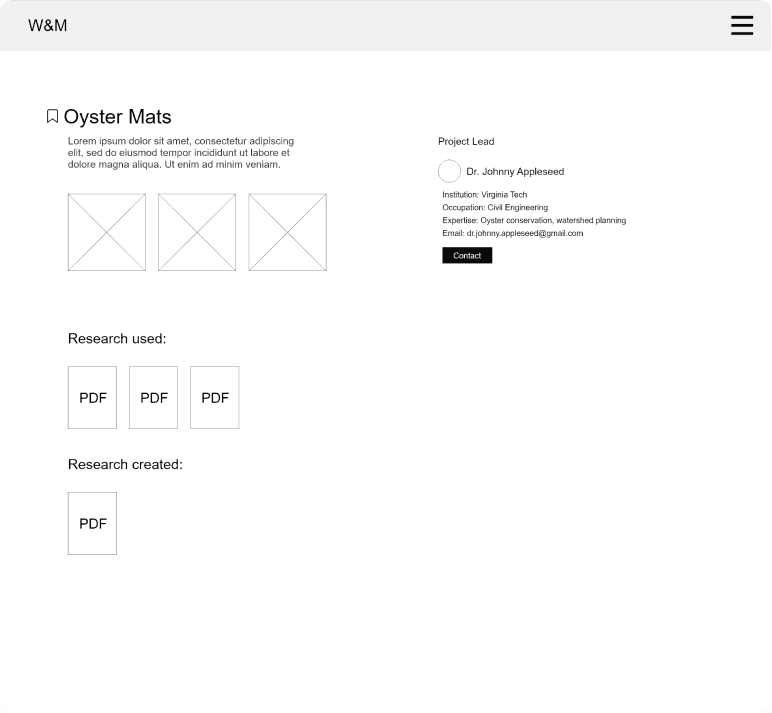
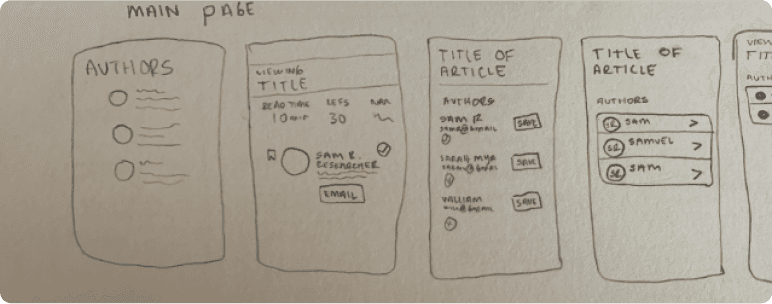
We began our design process with low-fidelity wireframes that explored a central idea: a “conservationist’s collection.”
This concept imagined a shared website where users could browse research, learn from others’ projects, and connect directly with authors or practitioners.
Our early goal was to bridge the gap between contributors—those generating knowledge—and workers who rely on that knowledge in the field.
SEARCH EXPERIENCE
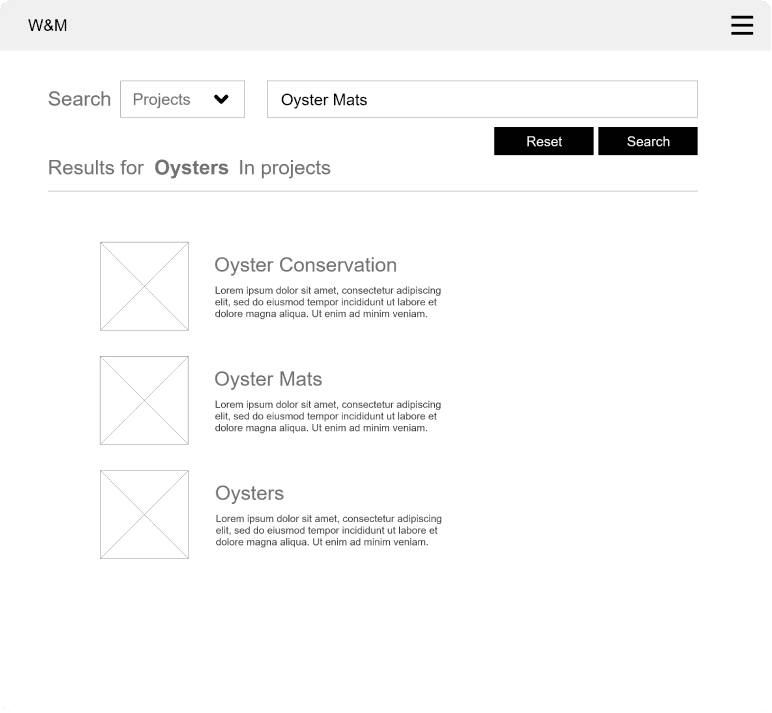
To support this, we designed a search experience that allowed users to look up a specific topic or conservation field and immediately see related projects, research papers, and discussions.
Each project page surfaced key information such as the lead author, the research used or created, and relevant contact details. We wanted this environment to feel open, organized, and collaborative, giving users a way to trace how ideas and findings connect across the community.
STRUCTURE VS USABILITY
These early wireframes helped us visualize how information could be centralized in one place and how users might navigate between topics, authors, and resources.
While the concept showed promise, our first round of testing later revealed opportunities to streamline this experience even further—insights that ultimately led to our pivot toward a more lightweight solution.
USER TESTING
To validate our early concept, we conducted a series of think-aloud usability tests.
Participants were given realistic scenarios and asked to navigate the platform while sharing their thought process. We measured both task completion and confidence levels, and the results were remarkably high.
User Test #1
100% completion
User Test #2
100% confidence
Participants moved through the interface smoothly and felt assured in their actions.
However, our post-test interviews revealed a more nuanced picture: Conservationists needed support not only in accessing what they already knew to look for, but also in uncovering new collaborators, insights, and connections that weren’t yet visible to them.
While the tool was easy to use and genuinely helpful for navigating known information, it did not address the deeper challenge surfaced in our research: the difficulty of discovering unknown information.
Conservationists needed support not only in accessing what they already knew to look for, but also in uncovering new collaborators, insights, and connections that weren’t yet visible to them.
This insight was critical. It showed us that our initial platform, while functional, wasn’t solving the core problem.
As a result, I led a pivot away from a centralized search model and toward a solution that surfaces meaningful connections in real time—reducing the need for users to actively search for information.
THE PIVOT
With our testing insights in mind, we shifted our focus toward enabling real-time information discovery. We revisited our interview data and asked a key question:
How might we design an experience that could surface the information users need before they even know to look for it?
This reframing pushed us away from a static, searchable platform and toward something more integrated into a conservationist’s existing workflow.
During our interviews, we noticed that many conservationists already relied on browser extensions, such as Grammarly, to support their daily tasks. This insight opened a new direction.
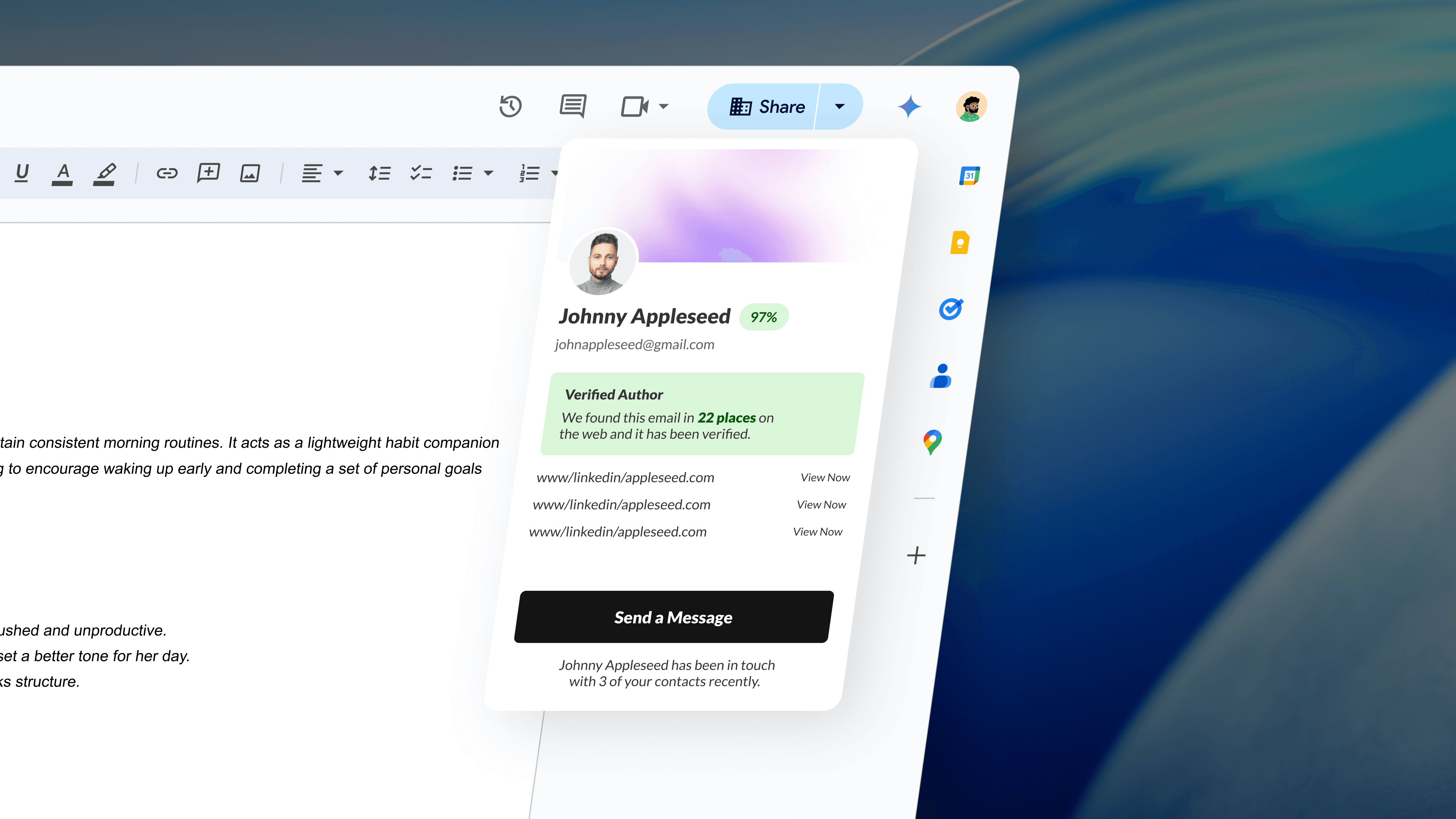
Instead of asking users to visit a separate website, we began exploring the idea of a lightweight browser extension that could automatically pull related research, reports, and author details while they read or write online.
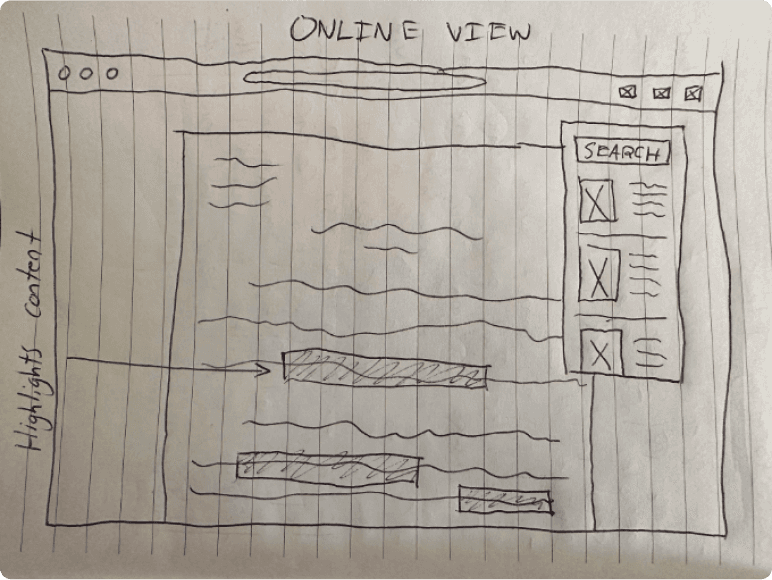
We translated this direction into a new set of wireframes for an interactive browser extension. In this model, the extension would read the user’s report and instantly search its database for related research, surfacing connections in real time.
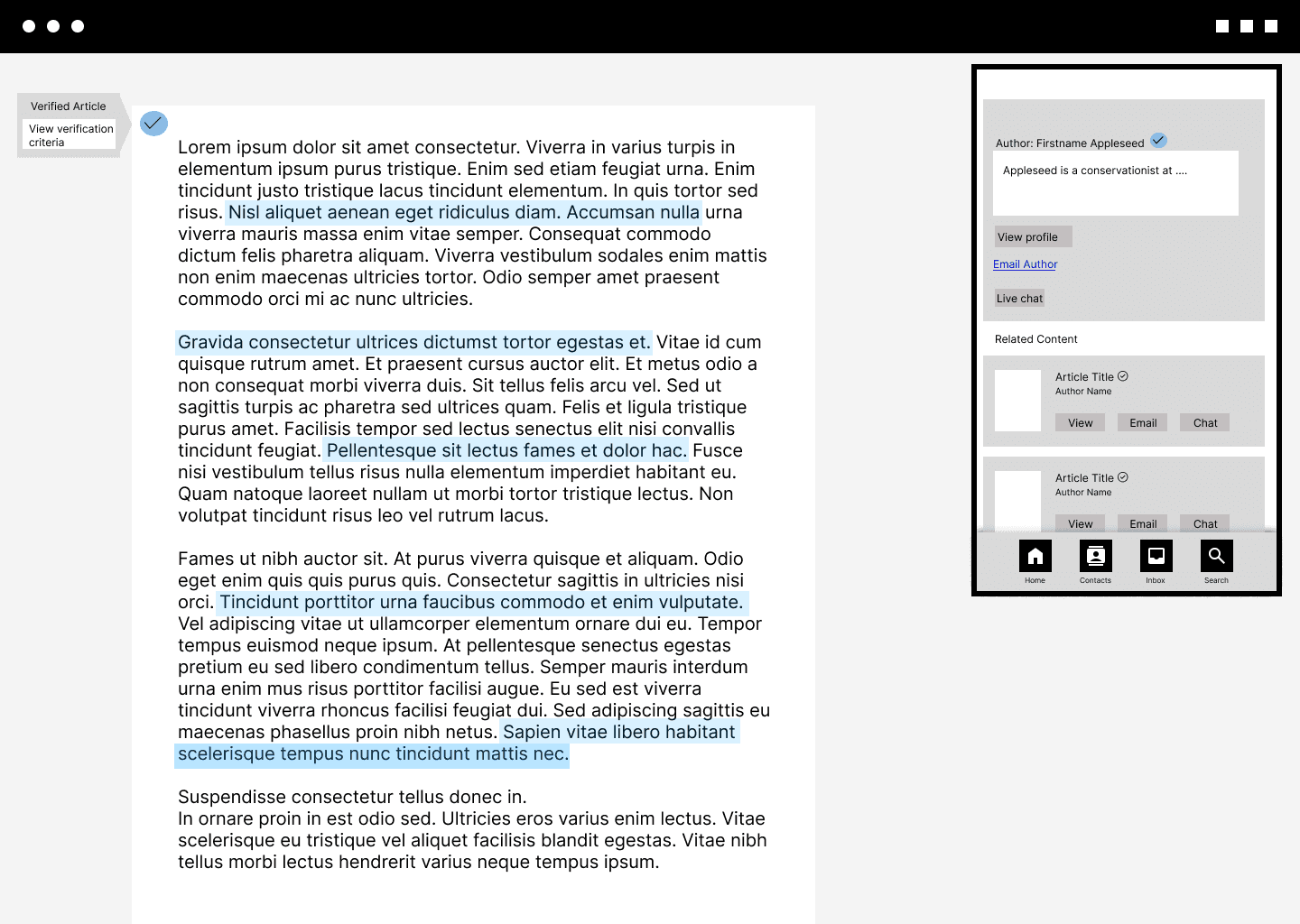
As the user worked, the extension highlights sections of their report where relevant publications or authors are identified. From there, users could open related work, verify authors, and reach out directly—making it easier to collaborate and integrate new insights without disrupting their workflow.
DESIGN GOALS
The design goals for this pivot were straightforward:
Provide clear author verification
Support effortless collaboration
Streamline online research without adding extra steps
Most importantly, it needed to promote communication between contributors and workers by surfacing both known and previously unknown information in real time.
VALIDATING THE NEW DIRECTION
To validate the new browser extension concept, we ran a second round of think-aloud usability sessions. Participants were given two tasks modeled after real conservation workflows, and we measured both task completion and confidence levels.

Task 1
Find a related research paper to the report you are working on.
This task had a 100% completion rate, and participants reported high confidence in their ability to complete it. The inline surfacing of related research aligned closely with their expectations and felt intuitive within their workflow.

Task 2
Check whether the author of the related report is verified.
This task had a 40% completion rate, indicating significant findability issues. Although confidence levels remained moderate, many participants did not realize the verification percentage was interactive. In post-test interviews, they noted that the element didn’t look clickable and didn’t match their mental model of how verification should be presented.
These insights highlighted a clear usability gap:
While the extension successfully delivered relevant information in real time, the author verification feature needed clearer affordances to ensure users could trust and act on the information provided.
HIGH-FIDELITY DESIGN & FURTHER USER TESTING
With our core solution validated, we moved into refining the design through iterative improvements.
We incorporated the insights from our pivot testing—especially around verification clarity—and developed high-fidelity mockups that reflected a more polished and intuitive experience.
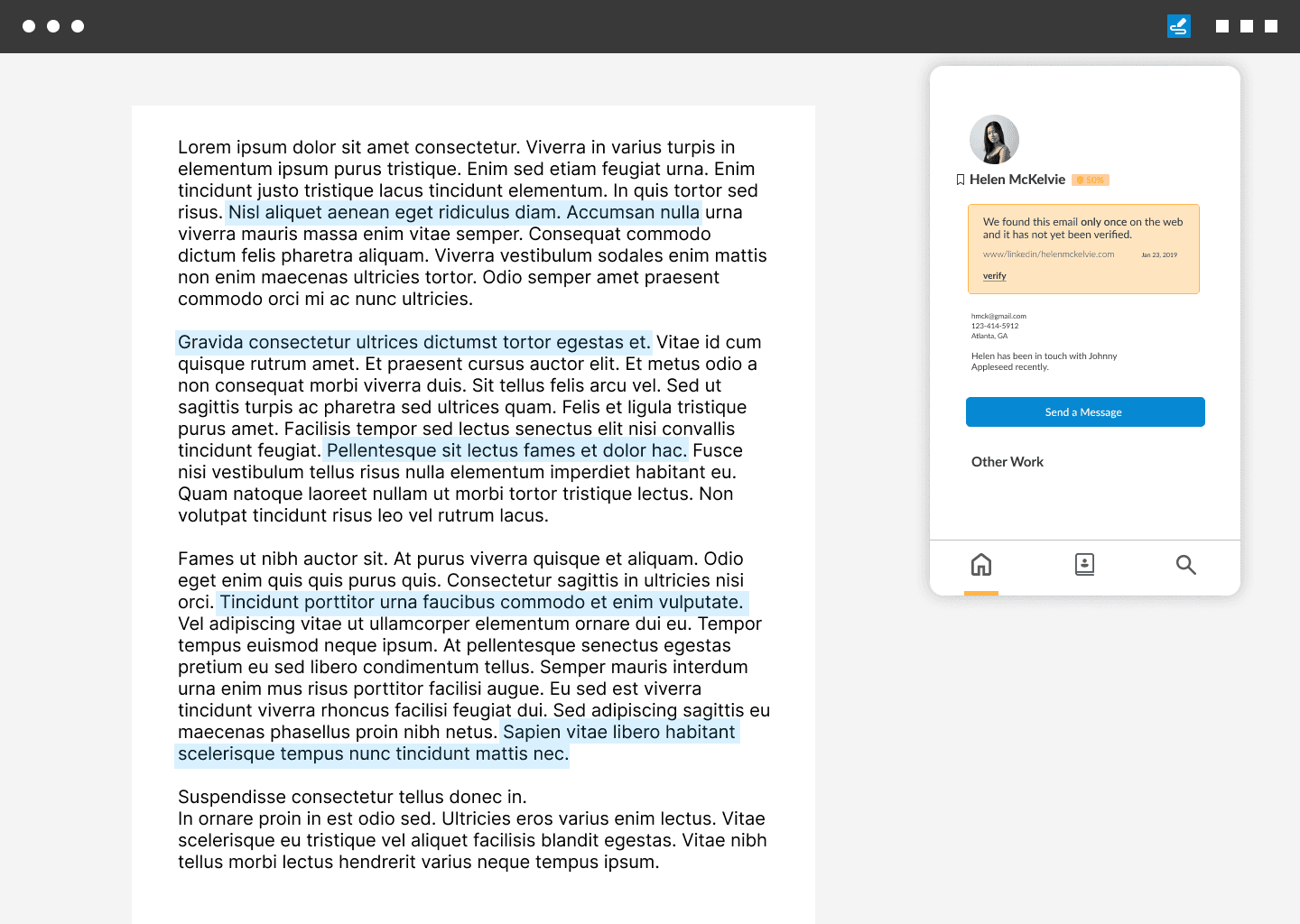
I then refined the UI and completed a final user testing session, which returned 100% task completion and confidence levels across all participants.
These results confirmed that the refinements successfully resolved earlier usability issues and validated the strength of the updated design.
REFLECTION & NEXT STEPS
In hindsight, I would have liked to explore the role of AI more deeply.
Thoughtful integration, such as summarizing findings, highlighting consensus across sources, or suggesting next steps, could further bridge the gap between knowledge and action, helping users move from insight to impact more efficiently.
Looking ahead, I see opportunities to expand Green Pages beyond the conservation space. The ability to surface related research, verify authors, and enable direct collaboration is valuable across many research-driven fields. With further development and testing, the extension could support a broader community of practitioners who rely on fast, credible information to inform their work.